Groovy Dog: A Playful Display Font That Delivers When Used Right
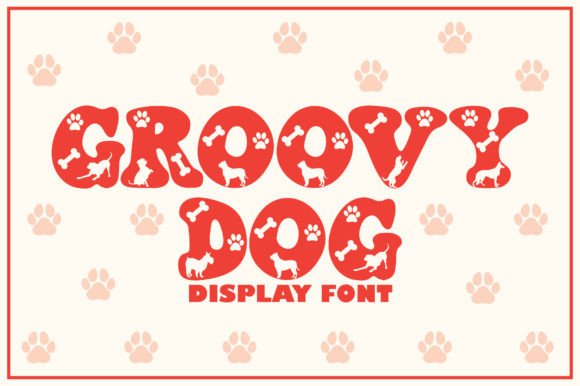
If you are looking to inject a sense of whimsy and retro charm into your next project, Groovy Dog is a display font that stands out for its personality. It is undeniably cute, featuring rounded edges and playful character shapes that instantly evoke a feeling of fun. However, the allure of a "cute" font can sometimes lead designers and creators to overlook the practical limitations of display typefaces. While Groovy Dog is perfect for headlines, logos, and crafty ideas, treating it like a workhorse body text font is a common pitfall that can ruin readability and professional presentation.
Understanding where this font shines—and where it struggles—is the difference between a design that pops and one that feels cluttered or amateurish. Whether you are a small business owner designing a logo for a pet boutique, an educator creating classroom materials, or a freelancer crafting social media graphics, knowing how to apply Groovy Dog correctly ensures your message lands with clarity and style.
Defining the Role of Groovy Dog in Your Design
Groovy Dog is not just another sans-serif; it is a character-driven typeface designed specifically for impact at larger sizes. Its structure relies on thick strokes and exaggerated curves, which make it incredibly legible when used as a focal point. This makes it an excellent choice for t-shirt designs, party invitations, product packaging for children's goods, and bold headers on websites.
The interest in fonts like Groovy Dog often stems from a desire to humanize a brand or project. In a digital landscape filled with rigid, corporate typography, a font with a "dog-like" friendliness can lower barriers to entry and make content feel more approachable. However, the very features that make it cute—its irregular spacing and decorative elements—are what limit its versatility. Recognizing these boundaries early prevents frustration later in the design process.
Common Mistakes When Using Display Fonts
One of the most frequent errors I see among beginners and even some professionals is the overuse of display fonts in long-form text. Because Groovy Dog looks so inviting, there is a temptation to use it for entire paragraphs, blog posts, or email newsletters. This is a critical mistake. The intricate details and wide tracking of the characters become difficult to decipher when reduced to 10 or 12 points. Readers will struggle to follow the flow of information, leading to high bounce rates and poor user experience.
Another oversight involves pairing. Many designers assume that because a font is "fun," it should be paired with other equally busy or decorative fonts. This creates visual noise. When Groovy Dog is placed next to another heavy or script-style font, the two compete for attention, resulting in a chaotic layout that lacks hierarchy. The result is a design that feels unpolished and confusing, undermining the professionalism you might be trying to convey.
Furthermore, ignoring the context of the audience is a significant risk. While Groovy Dog is fantastic for a kids' birthday party or a casual lifestyle blog, it may send the wrong signal for a legal firm, a medical practice, or a financial report. The "groovy" aesthetic implies informality. Using it in a setting that demands authority and seriousness can inadvertently diminish the perceived credibility of your work.
How Poor Choices Impact Your Results
The consequences of misusing a font like Groovy Dog go beyond simple aesthetics. When readability suffers, communication fails. If a customer cannot quickly scan your headline or read the details on your flyer, they are likely to move on to a competitor whose design is clearer. In terms of efficiency, spending hours tweaking a layout only to realize the font choice was fundamentally flawed wastes valuable time and resources.
From a branding perspective, inconsistency hurts recognition. If you use Groovy Dog for everything, your brand loses the ability to distinguish between primary messages and supporting details. Hierarchy is established through contrast; without a neutral body font to balance the playful display font, your content lacks structure. This lack of structure can lead to a perception of carelessness, affecting trust and satisfaction among your audience.
Practical Strategies for Better Application
To avoid these pitfalls, start by strictly defining the role of Groovy Dog in your project. Limit its use to titles, subtitles, logos, and short pull quotes. For any text block longer than a sentence or two, switch to a clean, neutral sans-serif or serif font. This combination allows Groovy Dog to do what it does best—attract attention—while ensuring the rest of your content remains accessible and easy to digest.
When selecting a companion font, look for simplicity. A minimalist sans-serif like Helvetica, Open Sans, or Roboto provides the necessary breathing room for Groovy Dog to shine without competition. The goal is contrast: let the playful font be the star, and let the neutral font be the reliable support. Test your pairings by printing them out or viewing them on mobile devices to ensure the balance holds up across different mediums.
Consider the medium before you commit. If you are designing for a website, check how Groovy Dog renders at various screen resolutions. Some decorative fonts lose their charm when pixelated or viewed on low-quality displays. Always preview your work on multiple devices to guarantee that the "cuteness" doesn't turn into a blur of pixels.
Evaluating Groovy Dog Before You Download or Buy
Before integrating Groovy Dog into your workflow, take a moment to evaluate the specific version available to you. Not all free downloads are created equal. Check the character set to ensure it includes all the glyphs you need, such as special characters, ligatures, or extended language support if you are working internationally. A limited character set can force you to switch fonts mid-project, breaking the visual consistency of your design.
Also, review the licensing terms carefully. Even if a font is free for personal use, commercial applications often require a paid license. As a freelancer or small business owner, using a font commercially without the proper license can lead to legal complications and costly fines. Ensure you understand whether the license covers web embedding, app usage, or print-on-demand services, depending on your specific needs.
Finally, test the font in your actual design environment. Download a trial version or use a web-based preview tool to see how it interacts with your color palette and imagery. Sometimes a font that looks great in isolation clashes with your brand colors or background textures. Seeing it in context is the only way to be certain it will deliver the results you expect.
Conclusion: Confidence Through Clarity
Groovy Dog is a delightful asset for any creative toolkit, offering a unique blend of retro flair and modern cuteness. By respecting its limitations and applying it strategically, you can create designs that are both engaging and effective. Avoid the trap of overuse, prioritize readability, and always match the tone of the font to the intent of your message. With these adjustments, you can confidently add Groovy Dog to your projects and enjoy the positive response it generates from your audience.